
The flexible Excel data workspace
Connect sources, organise companies, build queries, create your own Excel output, analyse worksheets and schedule refresh or delivery.
KalkuleX in plain English
KX connects business data to the Excel work and controlled processes people actually need. It removes repetitive data preparation while leaving users in control of the calculations, presentation, review and decisions.

Connect sources, organise companies, build queries, create your own Excel output, analyse worksheets and schedule refresh or delivery.
Build on the same foundations with management reporting, consolidation, planning, receivables, purchasing, inventory, production, workforce and governed actions.
The end of repetitive Xero CSV exports
A user should not need to export a CSV, repair it, work out how tables relate and repeat the entire exercise next month. Nor should they need to become a database engineer to build a useful Excel report.
Download files, repair formats, create lookups and hope the workbook still uses the right data.
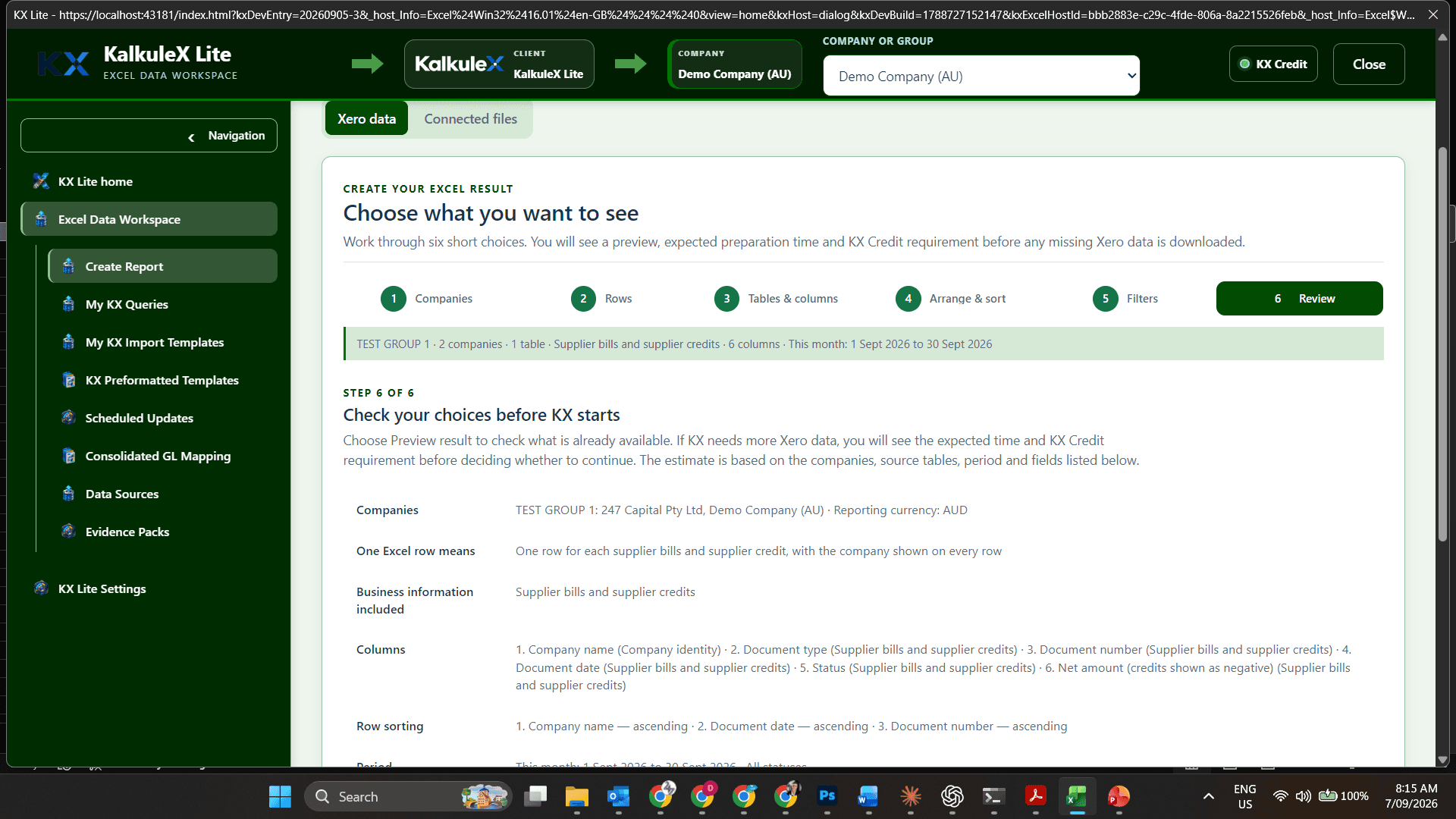
KX assesses the authorised, available and compatible tables and fields, then shows the proposed query.
Review it, run it and preserve the setup for the next refresh or scheduled update.
CSV remains supported when a file is genuinely the source. Recurring Xero work no longer has to begin with a manual download.
What KX Lite lets a user do
The user chooses the business outcome. KX handles the source structure, compatible relationships, controlled retrieval and repeatability behind it.
Use authorised Xero organisations, Excel or CSV files, public web tables and approved provider connections.
Describe the information required or use the guided query wizard. KX proposes compatible tables, fields, filters and relationships for review.
Use one company or reusable groups organised by region, division, ownership, operating model or reporting purpose.
Create custom reports, models, reconciliations, forecasts, board packs, operational analyses, dashboards or business-specific workbooks.
Preserve the approved query and worksheet setup, then refresh the workbook without repeating exports, cleanup and lookups.
Run saved queries, workbooks, report packs and approved KX-AI work on a schedule, even when Excel is not open.
Save the result, hold it for review or release it through an approved email connection when the configured rule permits.
Choose an approved model for explanations, unusual-value review, finance follow-ups, commentary or query refinement, with an estimate and approval first.
Why finance users choose Excel
KX does not dictate a standard dashboard, report layout or analysis model. Users retain control of formulas, calculations, charts, formatting, commentary and presentation. KX handles the connections, data structure, refresh and scheduling.

Real Excel output examples
KX prepares connected, repeatable data for the Excel work users already understand. The user controls the calculation, layout, commentary and final business purpose.
| What the user wants | What KX does | What the user gets in Excel |
|---|---|---|
| Monthly management report | Retrieves the approved accounts and transactions using the saved companies, dates and query. | A branded Excel report that can be refreshed for the next reporting period. |
| Group cash position | Combines the selected Xero organisations while preserving the identity of every source company. | One workbook with group, company and regional views designed by the user. |
| Receivables review | Retrieves invoices, contacts, due dates, payment status and the fields chosen for follow-up. | An ageing, collections or customer-review worksheet that can be updated on schedule. |
| Custom dashboard or scorecard | Refreshes the underlying approved data without dictating the dashboard layout. | The user's own formulas, measures, charts, colours and presentation. |
| Board or executive reporting pack | Runs saved sources, periods and worksheet preparation consistently for review. | Updated Excel reports, commentary inputs and supporting schedules ready for review. |
| Business-specific operational analysis | Combines authorised Xero data with selected Excel, CSV, web-table or approved provider data. | A purpose-built workbook for the organisation's own operational questions. |
What KX Suite is designed to cover
Xero remains the accounting system of record. KX Suite adds the operational detail, responsibility, review, approval and evidence needed to complete the wider work.

Product status: this is the intended completed KX Suite scope. Current release availability must be checked separately; the list does not claim that every Suite module is production-ready today.
Xero, Excel, Copilot and KX
Invoices, bills, payments, accounts and the accounting source of truth.
Calculations, models, reports, charts, working papers and business-specific analysis.
Helps users ask questions, analyse information and prepare Microsoft 365 content.
Connects the sources, prepares the query, refreshes the workbook and controls the wider workflow.
Detailed product comparison
Direct access to information, reusable Excel work and controlled business workflows are different needs. This is the practical distinction.
| What the user needs | Xero + Microsoft 365 / Copilot | KX Lite | KX Suite |
|---|---|---|---|
| Ask a current question about one organisation | A strong fit for direct questions and current information when the required data is available. | Available as part of a saved Excel query or a wider repeatable report. | Used within a controlled finance or operational workflow. |
| Build a custom Excel report, model or dashboard | Helps analyse or draft after the information reaches Microsoft 365. | Preserves the user's workbook design while managing the source, query and refresh. | Adds shared permissions, workflow, review and business-wide modules. |
| Refresh or schedule recurring work | Depends on the Microsoft and Xero capability made available for the task. | Refreshes saved queries and can schedule approved work without rebuilding the workbook. | Coordinates recurring work across modules, responsibilities and approvals. |
| Combine several data sources | Not the announced core purpose of the Xero and Microsoft 365 connection. | Can use authorised Xero organisations, Excel or CSV files, web tables and approved providers. | Uses the same governed source foundation across wider business processes. |
| Organise many companies in reusable groups | Not the announced core purpose of the connection. | Supports reusable groups by region, division, ownership or any useful operating structure. | Carries company context into reporting, consolidation and operational workflows. |
| Assign work, approve decisions and retain evidence | Users manage the surrounding process themselves. | Retains the approved query, source identity and refresh definition for the Excel result. | Adds responsibility, permissions, approvals, evidence, recovery and governed actions. |
The practical difference
KX is for users who need business information organised into a repeatable process with a useful, reviewable outcome.