The Xero Microsoft 365 integration and KX Lite both bring authorised Xero data into Excel through independent connections. Microsoft provides connected information and Copilot questions. KX Lite links related records, combines companies, saves the report setup and refreshes it later.
BOTH CONNECT XERO TO EXCELREVIEWED SEPTEMBER 2026CHOOSE FOR THE OUTCOME YOU NEED
SAME DESTINATION · DIFFERENT PURPOSE
Same Xero-to-Excel destination. Two very different user outcomes.
KX Lite also brings your Xero data directly into Excel. It uses its own connection—not the Xero–Microsoft connector. Microsoft makes connected information available in its applications. KX Lite also links related records, combines companies, saves the report setup and refreshes it later.
KX LITE · DIRECT XERO-TO-EXCEL CONNECTION
Xero data becomes a report you can use again.
01KX connects directly to each Xero organisation you can use
02KX already knows how supported invoices, customers, accounts and payments relate
03The selected information is assembled into the Excel report you need
04The setup can be saved, checked, refreshed and scheduled
Choose companies, columns, dates, filters and ordering in ordinary business language. KX handles supported links and account matches; you do not need to write database queries or work out how tables join.
XERO + MICROSOFT 365
Xero information becomes available in Microsoft tools.
01The signed-in user authorises access to Xero information
02Microsoft 365 retrieves current information according to those permissions
03Excel tables, Copilot answers or document content become available
04The user builds and maintains the resulting finance process
This is useful connected access. The reviewed public material does not describe KX-style linked-record assembly, account matching, GL Cross-Match, eliminations, approvals, scheduling and permanent history as one saved finance process.
FROM ISSUE TO REUSABLE RESULT
KX closes the finance-work loop.
A connected table leaves the finance process to the user. KX carries the business need through linked-record preparation, human review and a saved result with a history that remains ready for the next run.
OUTCOME Less reconstruction. More repeatable finance work.
The model may be familiar. The KX finance boundary is not.
KX Ai may use KalkuleX-managed OpenAI or Anthropic services, but it is not an open-ended ChatGPT or Claude chat. KX defines the task, sends only the worksheet information needed for it, adds the relevant finance context and keeps the result inside the KX review history.
01User selects the purposeOnly the required worksheet information02KX prepares the minimum dataNo Xero credentials or direct ledger access03KX Ai assistsAnalysis, explanation and drafting inside the boundary04Human decidesAI provenance remains permanently visible
ZERO KX Ai ACCESS TO XERO LEDGERS. EVER.
KX Ai
Purpose-defined finance assistance.
Only the worksheet information needed for the approved task is prepared. KX supplies the company, account-matching and workflow context, then keeps review decisions, the AI record and supporting information.
No Xero credentials. No Xero API client. No AI-created Xero write.MICROSOFT COPILOT + XERO
Questions over authorised connected information.
Microsoft describes real-time, read-only retrieval that follows the signed-in user's Xero permissions. It helps the user ask questions inside Microsoft 365.
Connected information—not the retained KX finance workflow.YOUR OWN CHATGPT OR CLAUDE ACCOUNT
General-purpose assistance directed by the user.
The user chooses what to upload, paste or connect and must supply the finance context. Data handling depends on the selected product, plan and settings.
No automatic KX mappings, approvals, schedules or immutable KX evidence.
The difference is not simply which model answers. KX controls the purpose, minimum-data preparation, finance context, review, evidence and permanent AI-to-Xero denial before a managed model service is called.
KX LiteGoverned finance work: relate, resolve, review, repeat and prove.CONNECTED DATAUseful access—but the user still owns the finance process.
SIDE-BY-SIDE
The practical differences.
Decision areaKX Lite · saved finance workspaceXero + Microsoft · connected data experience
Connection path
KX Lite connects directly to each Xero organisation you are allowed to use
Xero connects its information to the supported Microsoft 365 experience
What you get
A selected Excel report that can be checked, saved and refreshed
Live structured tables, answers and content inside Microsoft applications
Related records
KX Lite already knows how supported invoices, customers, accounts and payments relate; you do not write database queries
Public information describes structured Xero tables for the user to analyse and model
Worksheet design
Compatible information can be assembled into one worksheet with company and financial context retained
Structured Xero tables are made available for the user to analyse and model in Excel
Use it again
Save the companies, columns, dates, filters, account matches and template, then refresh them later
Keep the resulting Microsoft document or workbook and the functions available there
Scheduling
Approved recurring work can follow a controlled schedule and delivery path
A KX-style scheduled finance-work definition has not been identified in the reviewed public material
Price and approval
See the expected KX Credits and price first; approve each run or set your own limit
Final packaging for all announced Excel capabilities is not yet public; Microsoft 365 Copilot access is currently required
AI data boundary
KX Ai receives only the deliberately selected worksheet information required for the approved purpose; it has no Xero credentials, API client or ledger pathway
Microsoft describes real-time, read-only retrieval of information the signed-in user is authorised to access through the Xero federated connector
History
A permanent record of what was selected, approved, run and produced
A comparable permanent finance-processing history is not described as part of the announced Excel capability
Group finance controls
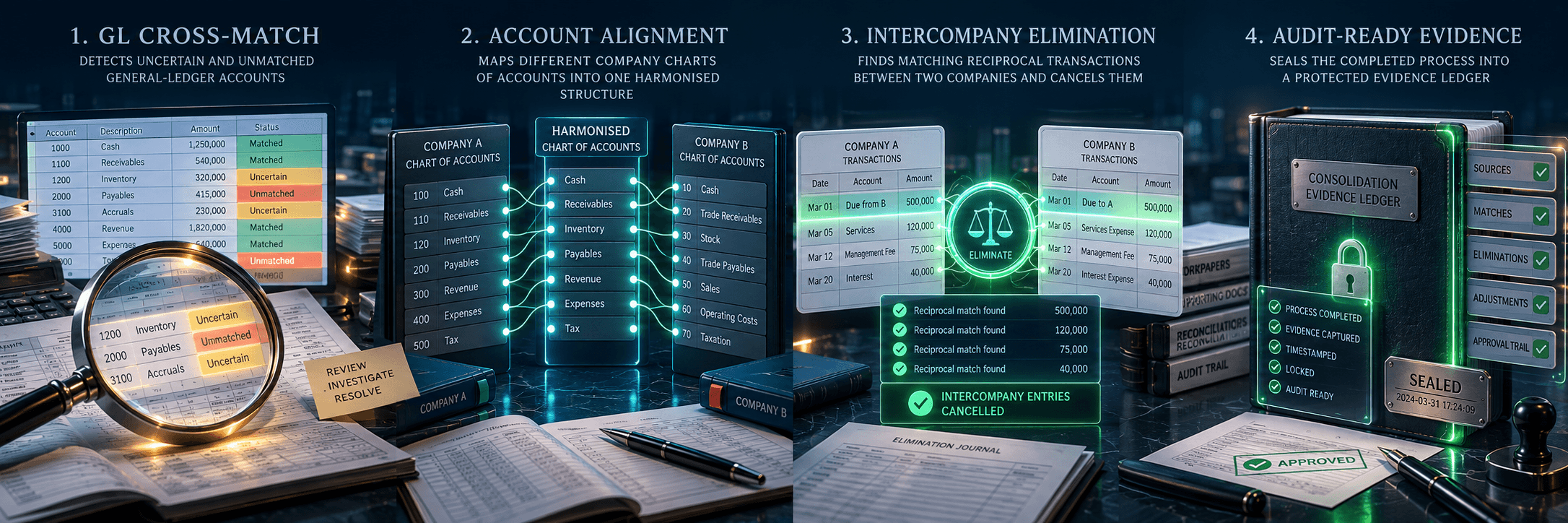
GL Cross-Match, account alignment and controlled intercompany elimination review
The announced scope centres on access, questions and Microsoft 365 document experiences
BEFORE YOU CHOOSE
Choose by the finance work you need completed.
If your requirement continues after the information reaches Excel, compare the process that remains—not only the connection that started it.
Do you need a current answer, or a finance process that must run regularly as information changes?KX saves the report setup so recurring work does not start again from raw tables.
Does the work span several companies, different Charts of Accounts or non-Xero sources?KX links related records and shows the source company across the selected organisations.
Must account matches, eliminations, review decisions and supporting documents remain visible?KX keeps account matches, approvals, processing history and supporting documents with the result.